Bulk SMS Software Bulk sms Software .net
Home Contact us Support Downloads Products Software Screenshot  

PC to mobile phone text messaging software create send infinite SMS messages to business groups individuals


PC to Mobile Bulk SMS Software PC to Mobile Bulk SMS Software
Pocket PC to Mobile Bulk SMS Software Pocket PC to Mobile Bulk SMS Software
PC and Pocket PC to Mobile Bulk SMS Software Bundle PC and Pocket PC to Mobile Bulk SMS Software Bundle

Award Winning Software
 
Rated 4 Stars 5 Stars Rating
5 Stars Rated Editor's Choice
Editor's Choice Cool Award
5 Stars Award Excellent Award
3 Stars Rated Editor's Choice
5 Stars Rating Excellent


PAD Software PAD url

PC to Mobile Bulk SMS Software PC to Mobile Bulk SMS Software $45


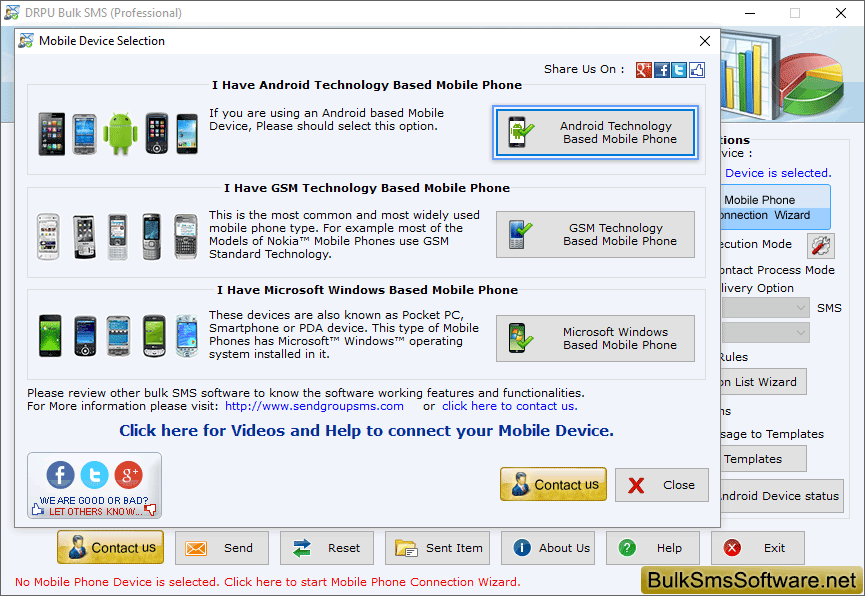
PC to Mobile Bulk SMS Software is the complete solution for mobile end users to create and send text messages in bulk to several other mobile users or individuals in no time. Easy to use yet powerful Mass messaging utility lets you to broadcast text messages direct from your computer connected to Windows OS based Pocket PC or other smart handsets mobile phone to any mobile network globally. You can enter the contact number either manually, or by importing contacts from phone book memory.

Advanced and instant communication technology enables you to broadcast message to any mobile phone all over the world without requiring any internet connection. It's perfect for managing business or marketing and establishes healthy relationship with customers in efficient and cost effective manner. Multi award winning bulk texting software provides a communication channel that is highly relevant in today's 'mobile' society, and able to balance your existing communication with your company staff, or clients.

Download the freeware demo version of PC to Mobile Bulk SMS Software which works with some limited functionality. You can understand the software features and upon satisfying, can purchase full version.

Software features:

  • Quick and Cost effective: Bulk sms software is an ideal instant and cost effective text messaging broadcasting technology with global network coverage.
  • Standard or Notification SMS: Facilitates you to send Standard SMS (which are automatically saved in Phone memory) or Notification (which are not saved automatically but with option to save).
  • Send bulk text messages: Mobile phone massive messaging tool is used to send mass text messages including job alerts, seasonal greetings, business advertisement, product promotions, event alerts, inauguration invitations, notifying customers of deals and promotional campaigns to selected contacts or individuals.
  • Supported Pocket PC brands: Nikon, Toshiba, Motorola, LG Electronics, HP iPAQ, Fujitsu, Lenovo, Samsung mobiles, HP, E-ten, Nokia, Honeywell dolphin, HTC Touch 3G and Touch Viva etc.
  • Global coverage: Advanced utility enables you to deliver text messages in large volumes at all national or international mobile network.
  • Easy to use: We provides easy to understand inbuilt user help manual with user friendly GUI so that software can be easily operated.
  • No need of technical skills: Any novice or technical user can easily operate the software without requiring any prior technical skills.

PC to Mobile Bulk SMS Software

Download Trial Demo

Download Demo

Alternate Download Demo


Order Online

Order now

using

Avangate

System requirement:

  • Pentium Class Processor
  • RAM (128 recommended)
  • 10 MB of Free Hard Disk Space

Operating system supported:

Windows Vista, XP, 2000, ME, NT, Server 2003, 98

Note:
Synchronizing your phone with your PC is the best way to transfer information, settings, and files. Synchronization is handled with different applications for Windows Vista and Windows XP or earlier, so please checks which operating system your PC is running and choose the appropriate option listed below.

  • If computer system is running on Windows Vista then synchronization settings will be managed through Windows Mobile Device Center.
  • If computer system is running on Windows XP then synchronization settings will be managed through Microsoft ActiveSync.


Home | Contact us | Support | Downloads | Products | Resources | Sitemap | Terms and Conditions